Registration How do I register?
Would you like to use your mhplus online branch? We'll show you how. Simply explained - step by step.
How to find the online branch
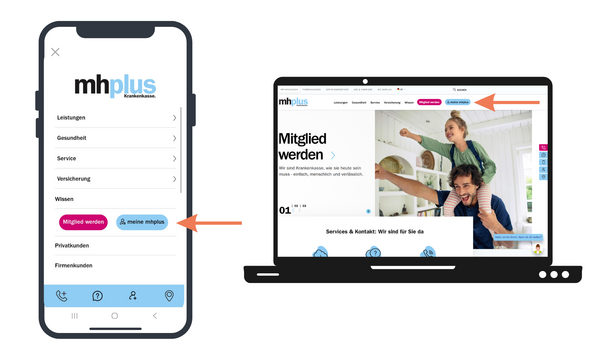
Open the mhplus website. Click on "my mhplus" in the top right-hand corner to go to the online branch.
You can easily use the online branch via common browsers, for example:
Google Chrome, Mozilla Firefox, Microsoft Edge, Opera, Safari.
Important: It is best to always use the latest version of your browser. Internet Explorer is not supported.
If you want to use the online branch with your smartphone, open the mhplus website. Then tap on the menu icon at the top left. There you will find the my mhplus section.
The same browser requirements apply here too.
Multiple applications. One login.
You use the same access data for the mhplus service app, the online branch and the ePA app.
The available access depends on the type of identification:
- Identification with activation code: Use of the service app and online branch. This flyer will help you.
- Identification with a secure identification procedure (e.g. ID card, PostIdent or health card): Use of the service app, online branch and ePA app. This flyer will help you.
Briefly explained: Secure login in the online branch
To increase security, logging in to the online branch is done using two-factor authentication.
Step 1:
Go to the online branch.
Step 2:
Log in with your policyholder number and the password you chose during registration. Your password serves as the first factor to confirm your identity.
Step 3:
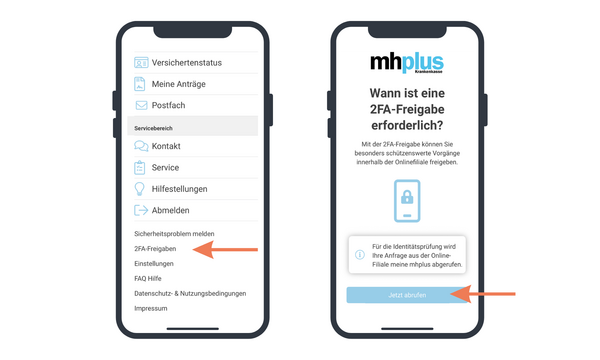
Then confirm your registration in the mhplus service app. To do this, open the app and approve the request. If the approval is not displayed directly, you can find open requests at any time in the menu item "2FA approvals". Your device serves as a second factor and provides additional security.
Please note: You must register in the service app before logging in to the online branch for the first time.
Registration
You can find out how to register in the service app via the following link. Once you have registered, you can use it to confirm your login in the online branch.