Registration How do I register?
Would you like to use your mhplus mind+move app? We'll show you how. Explained very simply - step by step.
Step 1: Download the mind+move app
Search for "mhplus mind+move app" in your app store or scan the QR code.
Download the mind+move app from your smartphone's app store.
Your mobile phone version must be at least iOS 13 or Android 8.0.
The app can also be downloaded on tablets that fulfil these system requirements.

Step 2: Create user account
- Open the app.
- Click on "Register" if you are already registered.
- If not, tap on "Create user account" to start the registration process.

Step 3: Register
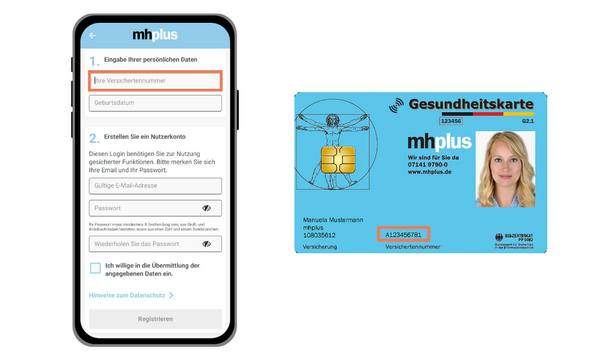
- Enter your insurance number and date of birth.
- The insurance number can be found at the bottom of the front of your health card.
- Also enter your e-mail address and a password.
- Confirm your consent to data transfer - and then tap on "Register".
- Finally, set a 4-digit PIN. This will allow you to log in more quickly later - without having to enter your e-mail address and password every time.
Note: Standardised login procedure
Did you already know? You can also use the mhplus bonus app with the same login details!
The bonus app rewards you for a healthy lifestyle.
Children and young people take part in Potzblitz.
Adults collect rewards with Fitcash.
And parents can take part in the Baby Bonus together with their child.
You can find more information here